Widgets and shortcodes
This page documents the preview (v2.21) version. Preview includes features under active development and is for development and testing only. For production, use the stable (v2024.1) version.
There are a number of display widgets and shortcodes available. All the shortcodes mentioned on this page are defined in /docs/layouts/shortcodes.
Heading (Skipping ToC)
To remove unnecessary headings from ToC.
# For Heading 2
{{< header Level="2" >}}Consistency{{< /header >}}

# For Heading 3
{{< header Level="3" >}}Consistency{{< /header >}}

# For Heading 4
{{< header Level="4" >}}Consistency{{< /header >}}

# For Heading 5
{{< header Level="5" >}}Consistency{{< /header >}}

# For Heading 6
{{< header Level="6" >}}Consistency{{< /header >}}
Admonition boxes
Use the note, tip, and warning shortcodes to create admonition boxes.
Tip
Tip
A tip box gives a hint or other helpful but optional piece of information.{{< tip title="Tip" >}}
A tip box gives a hint or other useful but optional piece of information.
{{< /tip >}}
Note
Note
A note box gives some important information that is often not optional.{{< note title="Note" >}}
This is a note with a [link](https://www.yugabyte.com).
{{< /note >}}
Warning
Warning
A warning box informs the user about a potential issue or something to watch out for.{{< warning title="Warning" >}}
This is a warning with a [link](https://www.yugabyte.com).
{{< /warning >}}
Iconified links
You can add a link to a url with an icon using the link shortcode which takes url as a string argument. Internal and external links will have different icons. You can use the :version variable to expand to all versions.
-
: External link
{{<link "https://www.google.com">}} -
: Relative internal link
{{<link "../syntax-diagrams">}} -
: Full path internal link
{{<link "/:version/explore">}}
Tables
Markdown supports tables. By design, Markdown table rows are on a single line, and adding bullets and multi-line code blocks in table cells has to be done using HTML on a single line. To make creating custom tables simpler, use the table shortcode. For example:
{{<table>}}
| col-1 | col-2 |
| ----- | ----- |
<!-- row with bullets and code block -->
|
- 1
- 2
- 3 |
```output
 k | v
---+---
 1 | 2
(1 row)
```|
<!-- row with tip block -->
| {{<warning title="Beware" >}} start and end rows with the pipe symbol {{</warning>}} |
{{<tip title="Awesome tip" >}} Use 3 ticks for code blocks with pipe symbols {{</tip>}} |
{{</table>}}
The above markdown should render a table as follows:
| col-1 | col-2 |
|---|---|
|
|
Beware start and end rows with the pipe symbol |
Awesome tip Use 3 ticks for code blocks with pipe symbols |
Inline section switcher
An inline section switcher lets you switch between content sections without a separate URL. If you want to link to sub-sections inside a switcher, use tabs. This widget looks as follows:
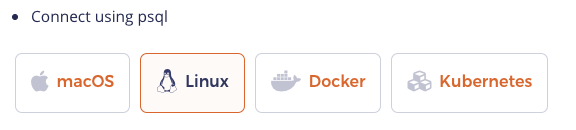
The corresponding code for this widget is as follows. Note that the actual content must be placed in a file with the .md extension inside a subdirectory; name the subdirectory such that it can be associated with the switcher title.
<ul class="nav nav-tabs-alt nav-tabs-yb">
  <li >
    <a href="#macos" class="nav-link active" id="macos-tab" data-bs-toggle="tab"
       role="tab" aria-controls="macos" aria-selected="true">
      <i class="fa-brands fa-apple" aria-hidden="true"></i>
      macOS
    </a>
  </li>
  <li>
    <a href="#linux" class="nav-link" id="linux-tab" data-bs-toggle="tab"
       role="tab" aria-controls="linux" aria-selected="false">
      <i class="fa-brands fa-linux" aria-hidden="true"></i>
      Linux
    </a>
  </li>
  <li>
    <a href="#docker" class="nav-link" id="docker-tab" data-bs-toggle="tab"
       role="tab" aria-controls="docker" aria-selected="false">
      <i class="fa-brands fa-docker" aria-hidden="true"></i>
      Docker
    </a>
  </li>
  <li >
    <a href="#kubernetes" class="nav-link" id="kubernetes-tab" data-bs-toggle="tab"
       role="tab" aria-controls="kubernetes" aria-selected="false">
      <i class="fa-regular fa-dharmachakra" aria-hidden="true"></i>
      Kubernetes
    </a>
  </li>
</ul>

<div class="tab-content">
  <div id="macos" class="tab-pane fade show active" role="tabpanel" aria-labelledby="macos-tab">
  {{% includeMarkdown "binary/explore-ysql.md" %}}
  </div>
  <div id="linux" class="tab-pane fade" role="tabpanel" aria-labelledby="linux-tab">
  {{% includeMarkdown "binary/explore-ysql.md" %}}
  </div>
  <div id="docker" class="tab-pane fade" role="tabpanel" aria-labelledby="docker-tab">
  {{% includeMarkdown "docker/explore-ysql.md" %}}
  </div>
  <div id="kubernetes" class="tab-pane fade" role="tabpanel" aria-labelledby="kubernetes-tab">
  {{% includeMarkdown "kubernetes/explore-ysql.md" %}}
  </div>
</div>
Include content from other files
The includeCode shortcode inserts the contents of a file as plain text, while readfile and includeMarkdown insert the contents of a file and renders it as markdown.
includeCode
Because it doesn't make its own code block, you can use this shortcode to build a code block from several sources.
The base path is /docs/static/.
This shortcode strips trailing whitespace from the input file.
Call includeCode in a fenced code block:
```sql
{{% includeCode file="code-samples/include.sql" %}}
```
To nest the code block, tell the shortcode how many spaces to indent:
1. To do this thing, use this code:

    ```sql
    {{% includeCode file="code-samples/include.sql" spaces=4 %}}
    ```
To specify highlighting options, do so on the fenced code block. This is a Hugo feature, not part of the shortcode. For example, add a highlight to lines 1 and 7-10:
```sql {hl_lines=[1,"7-10"]}
{{% includeCode file="code-samples/include.sql" %}}
```
includeMarkdown
Inserts the contents of a markdown file, rendered as part of the calling page. We use this primarily for syntax diagrams.
Landing Page sections
Learn through section
This widget looks as follows:

The corresponding code for this widget is as follows.
{{< sections/text-with-right-image
  title="Learn through examples"
  description="Microservices need a cloud native relational database that is resilient, scalable, and geo-distributed. YugabyteDB powers your modern applications"
  buttonText="Get started"
  buttonUrl="/preview/quick-start-yugabytedb-managed/"
  imageAlt="Yugabyte cloud"
  imageUrl="/images/homepage/learn-through-examples.svg"
>}}
To change image background to transparent, add imageTransparent=true in the code as shown below
{{< sections/text-with-right-image
  title="Learn through examples"
  description="Microservices need a cloud native relational database that is resilient, scalable, and geo-distributed. YugabyteDB powers your modern applications"
  buttonText="Get started"
  buttonUrl="/preview/quick-start-yugabytedb-managed/"
  imageAlt="Yugabyte cloud"
  imageTransparent=true
  imageUrl="/images/homepage/learn-through-examples.svg"
>}}
Other shortcodes
Note that the way you invoke a shortcode matters. Use angle brackets (< and >) to output plain text, and percent signs (%) to have Hugo render the output as Markdown.
For example, use {{< slack-invite >}} to output a bare URL for inclusion in a Markdown-style link, such as [YugabyteDB Community Slack]({{< slack-invite >}}): YugabyteDB Community Slack. Use {{% slack-invite %}} to output a clickable URL: https://communityinviter.com/apps/yugabyte-db/register.
Incomplete list of other shortcodes
- slack-invite
- Inserts the address for community slack invitations.
- support-cloud
- Inserts the address to open a YugabyteDB Aeon support ticket.
- support-general
- Inserts the address to open a support ticket with no pre-selected product.
- support-platform
- Inserts the address to open a YugabyteDB Anywhere support ticket.
- yb-version
- Inserts the current version of a particular release series.
- This shortcode has quite a few options. Refer to the comments at the top of the file for usage details.